File connector
The file connector allows you to connect a S3 Bucket or MS Sharepoint to the Backend and handle file operations with Data+.
On-premise installations can use the local file system as well.
Controlling access
To access any file API route, an API key is required. The key settings allow to specify the folder and operation that will be accessible.
Example:
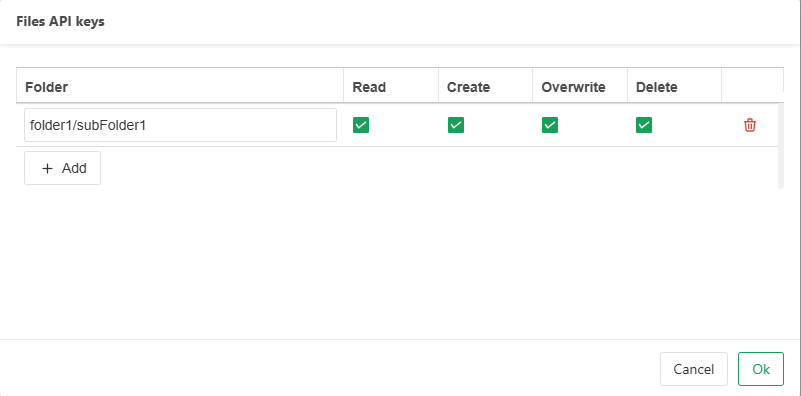
This key allows full access to folder1/subFolder1, meaning all API operations can be used for all files inside folder1/subFolder1.
This also means that any sub folder created within is accessible with the key.
Files located directly in folder1 cannot be accessed.
Qlik Cloud CSP for external file systems
When using an external file system, uploads and downloads are made directly to that server. Therefore, a Content Security Policy must be added to allow the connection.
Example for AWS:
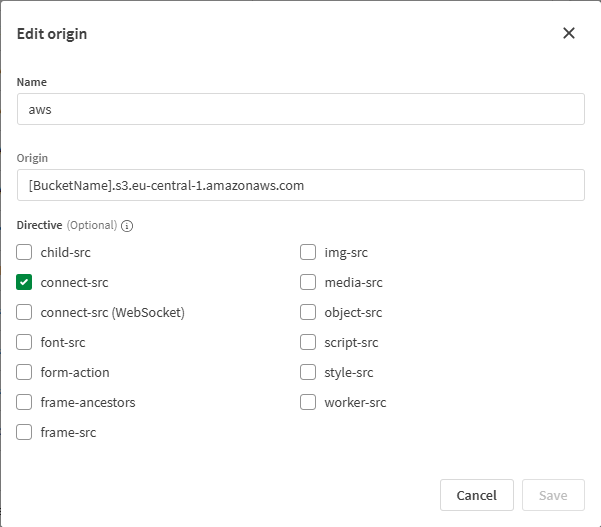
(adjust bucket name and region accordingly)